Platform-specific XAML markup in Uno
Uno Platform allows you to reuse views and business logic across platforms. Sometimes, though, you may want to write different code per platform, either because you need to access platform-specific native APIs and 3rd-party libraries, or because you want your app to look and behave differently depending on the platform.
This guide covers multiple approaches to managing per-platform markup in XAML. See this guide for managing per-platform C#.
Project structure
There are two ways to restrict code or XAML markup to be used only on a specific platform:
- Use conditionals within a shared file
- Place the code in a file that is only included in the desired target framework.
The structure of an Uno Platform app created with the default Visual Studio template is explained in more detail here.
XAML conditional prefixes
The Uno platform uses pre-defined prefixes to include or exclude parts of XAML markup depending on the target framework being used. These prefixes can be applied to XAML objects or to individual object properties.
Conditional prefixes you wish to use in XAML files must be defined at the top of the file, like other XAML prefixes. They can then be applied to any object or property within the body of the file.
For prefixes which will be excluded on Windows (e.g. android, ios), the actual namespace is arbitrary, since the Uno parser ignores it. The prefix should be put in the mc:Ignorable list. For prefixes which will be included on Windows (e.g. win, not_android) the namespace should be http://schemas.microsoft.com/winfx/2006/xaml/presentation and the prefix should not be put in the mc:Ignorable list.
Examples
Example 1
Using the following XAML:
<Page x:Class="HelloWorld.MainPage"
   xmlns="http://schemas.microsoft.com/winfx/2006/xaml/presentation"
   xmlns:x="http://schemas.microsoft.com/winfx/2006/xaml"
   xmlns:android="http://uno.ui/android"
   xmlns:ios="http://uno.ui/ios"
   xmlns:wasm="http://uno.ui/wasm"
   xmlns:win="http://schemas.microsoft.com/winfx/2006/xaml/presentation"
   xmlns:not_android="http://schemas.microsoft.com/winfx/2006/xaml/presentation"
   xmlns:d="http://schemas.microsoft.com/expression/blend/2008"
   xmlns:mc="http://schemas.openxmlformats.org/markup-compatibility/2006"
   mc:Ignorable="d android ios wasm">

 <StackPanel Margin="20,70,0,0">
  <TextBlock Text="This text will be large on Windows, and pink on WASM"
       win:FontSize="24"
       wasm:Foreground="DeepPink"
       TextWrapping="Wrap"/>
  <TextBlock android:Text="This version will be used on Android"
       not_android:Text="This version will be used on every other platform" />
  <ios:TextBlock Text="This TextBlock will only be created on iOS" />
 </StackPanel>
</Page>
Results in:
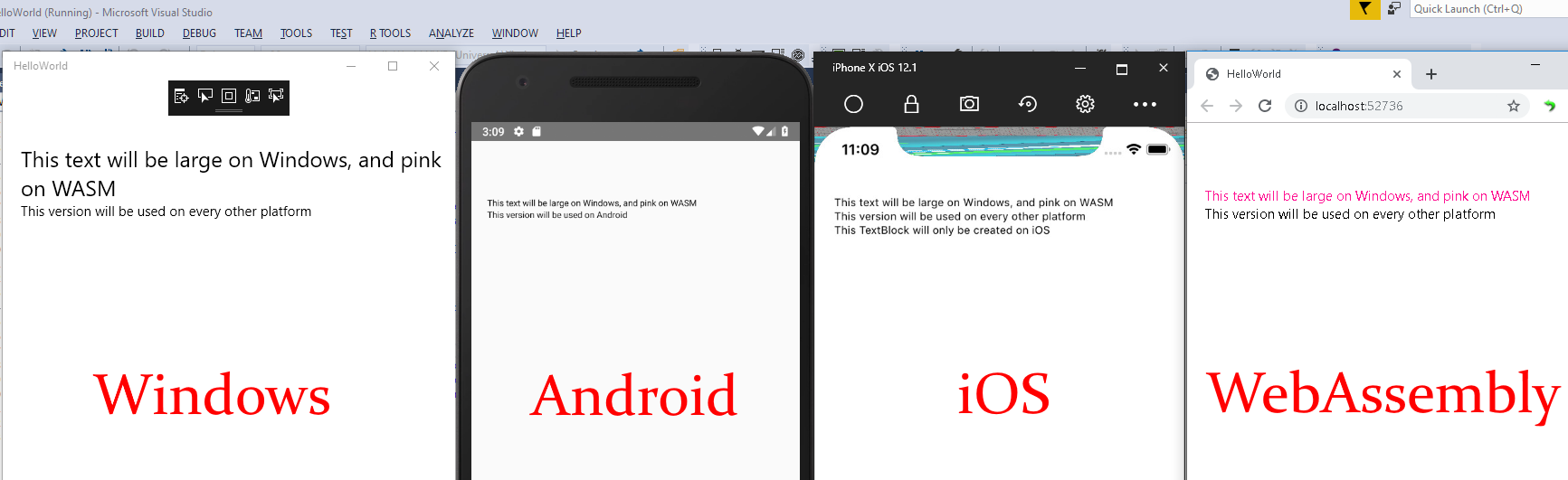
In this example note how the properties FontSize and Foreground are selectively used based on platform. The TextBlock property Text also has two different values based on whether or not the app is running in Android. Finally, an entire TextBlock is added if the app is running in iOS. This shows:
- How certain properties can be used based on the platform
- How the values of certain properties can be changed based on the platform
- How entire controls can be added or removed for certain platforms
Example 2
Platform-specific XAML also allows you to exclude a parent element and all its children. This is especially useful for cases where children are already part of a namespace but need to be excluded on certain platforms.
Consider the following XAML which is using the Windows Community Toolkit's Blur animation. While this runs for UWP, it is not currently supported in the Uno Platform and needs to be conditionally disabled. It isn't possible to add something like <win:interactivity:Interaction.Behaviors> to disable the behavior itself. Instead, the entire Grid is disabled on any platforms except Windows and child elements will be disabled along with it.
<Page x:Class="HelloWorld.MainPage"
   xmlns="http://schemas.microsoft.com/winfx/2006/xaml/presentation"
   xmlns:x="http://schemas.microsoft.com/winfx/2006/xaml"
   xmlns:behaviors="using:Microsoft.Toolkit.Uwp.UI.Animations.Behaviors"
   xmlns:toolkit="using:Microsoft.Toolkit.Uwp.UI.Controls"
   xmlns:interactivity="using:Microsoft.Xaml.Interactivity"
   xmlns:win="http://schemas.microsoft.com/winfx/2006/xaml/presentation"
   xmlns:d="http://schemas.microsoft.com/expression/blend/2008"
   xmlns:mc="http://schemas.openxmlformats.org/markup-compatibility/2006"
   mc:Ignorable="d android ios wasm">

 <Grid>
  <win:Grid Background="Gray">
   <interactivity:Interaction.Behaviors>
    <behaviors:Blur Value="7" Duration="0" Delay="0" AutomaticallyStart="True" />
   </interactivity:Interaction.Behaviors>
  </win:Grid>
  <Grid>
   <!-- Other page content -->
  </Grid>
 </Grid>
</Page>
Available prefixes
A prefix resolves from the target framework of the project being compiled. A class library sees the same prefixes as an application head built for the same target framework, so conditional markup behaves identically in both.
| Prefix | Target framework | Namespace | Put in mc:Ignorable? |
|---|---|---|---|
android |
netX.0-android |
http://uno.ui/android |
yes |
ios |
netX.0-ios |
http://uno.ui/ios |
yes |
tvos |
netX.0-tvos |
http://uno.ui/tvos |
yes |
desktop |
netX.0-desktop |
http://uno.ui/desktop |
yes |
wasm |
netX.0-browserwasm |
http://uno.ui/wasm |
yes |
winappsdk, or win |
netX.0-windows10.x (WinAppSDK) |
http://schemas.microsoft.com/winfx/2006/xaml/presentation |
no |
Each has a negated counterpart — not_android, not_ios, not_tvos, not_desktop, not_wasm, and
not_winappsdk (or not_win) — which applies to every target framework the positive one does not. The negated
prefixes use the default presentation namespace and do not need to be listed in mc:Ignorable, with the exception
of not_winappsdk / not_win, which the WinAppSDK XAML compiler cannot resolve.
Note
win and not_win are not deprecated. They are the original spelling of winappsdk and not_winappsdk,
both spellings resolve identically, and both remain fully supported — win and not_win are still the more
common form across Uno Platform's own markup. Nothing here retires them, and no migration is required. Pick one
spelling per file rather than mixing the two, since a file that uses win: alongside not_winappsdk: reads as
though the two name different conditions when they are exact opposites.
More visually:
| Prefix | netX.0 |
-android |
-ios |
-tvos |
-desktop |
-browserwasm |
-windows10.x |
|---|---|---|---|---|---|---|---|
android |
✖ | ✔ | ✖ | ✖ | ✖ | ✖ | ✖ |
ios |
✖ | ✖ | ✔ | ✖ | ✖ | ✖ | ✖ |
tvos |
✖ | ✖ | ✖ | ✔ | ✖ | ✖ | ✖ |
desktop |
✖ | ✖ | ✖ | ✖ | ✔ | ✖ | ✖ |
wasm |
✖ | ✖ | ✖ | ✖ | ✖ | ✔ | ✖ |
winappsdk |
✖ | ✖ | ✖ | ✖ | ✖ | ✖ | ✔ |
A project that targets a plain netX.0 therefore sees no positive prefix at all — only the negated forms. That is
the correct behaviour for a target framework that carries no platform.
Note
No prefix identifies a drawing backend. Uno.UI is compiled once and selects its backend at run time, so the
backend is not a compile-time condition and cannot be branched on in markup.
XAML prefixes in cross-targeted libraries
Conditional prefixes work in a class library exactly as they do in an application head, and resolve from the
library's own target framework. A library that multi-targets netX.0;netX.0-android;netX.0-ios therefore emits
android: markup in its -android assembly and ios: markup in its -ios assembly, and an application head
consumes the assembly matching its own target framework.
A library that targets only netX.0 has no platform prefix available, because there is no platform in its target
framework. Add the platform target frameworks you need conditional markup for.
Note
Before Uno Platform 7.0 the platform prefixes did not resolve this way: android:, ios: and wasm: were
suppressed on every target that rendered with Skia, which by 6.0 was all of them, and a library's
platform-specific assembly was replaced by its netX.0 one when consumed by a mobile head. Markup written
against that behaviour — in particular not_android: or not_ios: used to mean "everywhere" — now resolves
differently.
Specifying namespaces
Specifying CLR namespaces in platform specific XAML namespace can be done as follows:
<Page x:Class="HelloWorld.MainPage"
   xmlns="http://schemas.microsoft.com/winfx/2006/xaml/presentation"
   ...
   xmlns:android="http://uno.ui/android#using:My.Custom.Namespace1;My.Custom.Namespace2"
   ...
   mc:Ignorable="d android">
 <android:MyCustomType />
In this example, types prefixed in the android XAML namespace will be looked up in My.Custom.Namespace1, MyCustomNamespace2 then in all the namespaces defined in default namespace http://schemas.microsoft.com/winfx/2006/xaml/presentation.
Several CLR namespaces are covered by listing them in one #using: segment, separated by ;, as above. The XAML
prefix itself must be spelled exactly as one of the names in the table above — matching is an exact comparison
against the prefix, so a decorated variant such as xmlns:androidNamespace1 is not recognised as conditional and
is treated as an ordinary namespace. One conditional prefix per platform per file, with the CLR namespaces it needs
listed after #using:.
Note
When using Uno Platform 4.x and in the absence of CLR namespace specification (using the #using: prefix), type matching is done through partial name based matching, without using the namespace information. In Uno Platform 4.8, this partial matching can be controlled by the UnoEnableXamlFuzzyMatching msbuild property. Uno Platform 5.0 and later will be setting UnoEnableXamlFuzzyMatching to false by default and will force explicit type matching.
XAML Conditional Methods
You can use standard WinUI conditional XAML prefixes with Uno Platform, as documented here.
Currently the following conditional methods are supported:
- IsApiContractPresent(ContractName, VersionNumber)
- IsApiContractNotPresent(ContractName, VersionNumber)
- IsTypePresent(ControlType)
- IsTypeNotPresent(ControlType)
IsApiContractPresent
The following ContractName values are currently supported:
- "Windows.Foundation.UniversalApiContract": resolves to
trueifVersionNumberis 10 or below, andfalseotherwise. - "Uno.WinUI": resolves to
trueif theUno.WinUINuGet package (ie the WinUI 3 API mapping) is in use,falseif theUno.UINuGet package is in use.
All other contract names will resolve to false.
IsTypePresent
IsTypePresent() will resolve to true if the type is found and it isn't marked with the [NotImplemented] attribute. This is useful for conditionally enabling XAML in a more declarative way, instead of referring to specific platforms.
Limitations in cross-targeted libraries
IsTypePresent() is resolved at compile time. In a cross-targeted library, this means that for WebAssembly and Skia, it doesn't use the correct implementation status for those platforms, but instead uses the implementation status reported by the 'reference' Uno.UI .NET Standard 2.0 assembly. Therefore it may report an incorrect status for WebAssembly and/or Skia inside of a cross-targeted library.
Example
The following example uses IsTypePresent to use WebView to display content on platforms where it's available, and a custom control to display the content on platforms where WebView isn't supported:
<Page x:Class="HelloWorld.MainPage"
   xmlns="http://schemas.microsoft.com/winfx/2006/xaml/presentation"
   xmlns:x="http://schemas.microsoft.com/winfx/2006/xaml"
   xmlns:local="using:HelloWorld"
   xmlns:webviewpresent="http://schemas.microsoft.com/winfx/2006/xaml/presentation?IsTypePresent(Windows.UI.Xaml.Controls.WebView)"
   xmlns:webviewnotpresent="http://schemas.microsoft.com/winfx/2006/xaml/presentation?IsTypeNotPresent(Windows.UI.Xaml.Controls.WebView)"
   xmlns:local_webviewnotpresent="using:HelloWorld?IsTypeNotPresent(Windows.UI.Xaml.Controls.WebView)"
   xmlns:d="http://schemas.microsoft.com/expression/blend/2008"
   xmlns:mc="http://schemas.openxmlformats.org/markup-compatibility/2006"
   mc:Ignorable="d">

 <Grid>
  <webviewpresent:WebView Source="{Binding DisplayContent}" />
  <local_webviewnotpresent:WebViewSubstitute ContentSource="{Binding DisplayContent}" />
  <webviewnotpresent:TextBlock VerticalAlignment="Bottom" Text="Showing substitute for WebView">
 </Grid>
</Page>