Solution Structure
This guide briefly explains the structure of an app created with either the dotnet new unoapp template or the Uno Platform Template Wizard. It is particularly aimed at developers who have not worked with cross-platform codebases before.
The project files in an Uno Platform app
After creating a new solution called MyApp, it will contain the following project:
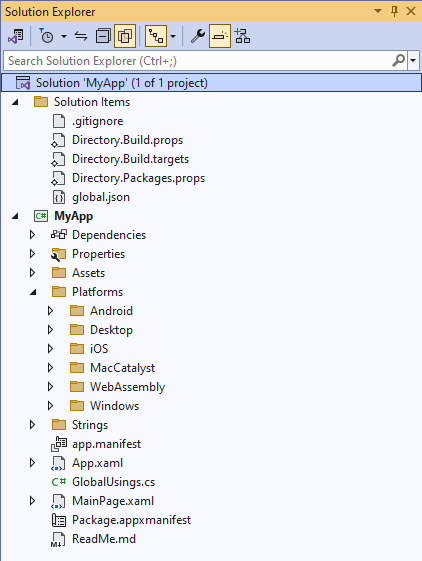
The MyApp.csproj project supports the Mobile (iOS/Android/Mac Catalyst), WebAssembly, Desktop (native macOS, Linux X11/Framebuffer, Windows 7+), and Windows App SDK.
This project contains all the code for your application, alongside platform-specific code found in the Platforms folder. Each of these folders is only processed as part of their target environment.
Further information
See additional guides on handling platform-specific C# code and XAML markup in an Uno Platform project.
Next Steps
Learn more about:
- Uno Platform features and architecture
- Hot Reload feature
- Troubleshooting
- List of views implemented in Uno for the set of available controls and their properties.
- You can head to How-tos and tutorials on how to work on your Uno Platform app.